Driver app
Your rides,in real time.
Get rides in real time, navigate to the customer, and keep dispatch updated on your location — all from your phone.

What it does
Built for driving.
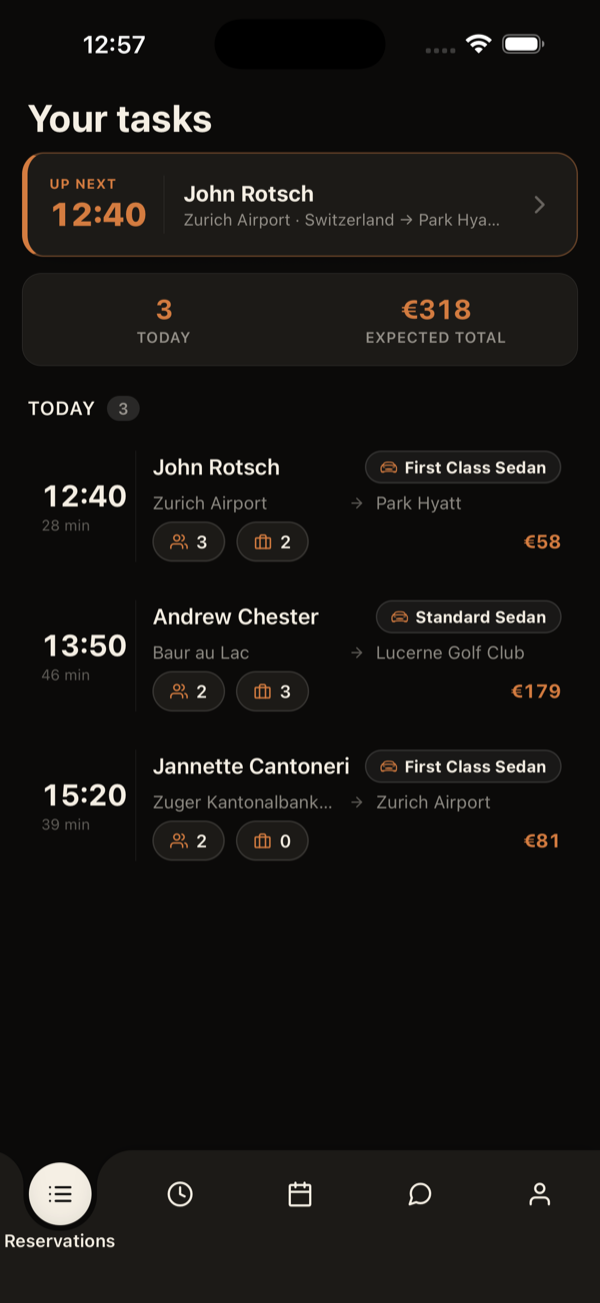
Real-time dispatch
New rides arrive instantly, with a sound alert and trip details.
Background location
Dispatch sees your position during the shift — and it stops the moment you log out.
Vehicle registration
Register your vehicle, photos and documents straight from the app.
Dispatch messaging
Talk to dispatch without leaving the trip.
Requirements
Device compatibility
iOS
15.1+
iOS 15.1 or later
Android
12+
Android 12 or later
Permissions
The app needs background location (so dispatch can see you during your shift) and notifications (to alert you to new rides even when the app is closed).
- Location (incl. background) — only while logged in.
- Notifications — new-ride alerts.
Changelog
How it has evolved.
Each release, and what it brought to the driver’s day.
- v2.15.7LatestNov 2026
Trips from partner companies
- On trips your company receives from a partner company, the trip steps are those of the company that sent it — the same ones its own drivers use.
- If your phone's language isn't available in the app, the app now shows in English (it used to be Portuguese).
- v2.15.6Nov 2026
App and dashboard at the same time
- If you also dispatch, you can stay signed in to the app and the web dashboard at the same time. Signing in or out of one no longer ends the other; signing in on another phone still ends the session on the previous phone.
- v2.15.5Nov 2026
A clear message when your account is suspended
- If your company suspends your driver account (or deactivates your account), the app ends the session and shows “Your driver account is suspended. Contact your dispatcher.” instead of a technical error.
- v2.15.4Oct 2026
The app shows only what your company allows
- Your company decides what you can do in the app: write in the messenger, change your work plan, choose your vehicle, collect payments, send receipts and edit your profile.
- Whatever your company does not allow no longer shows: a short note in its place explains why (for example, “Your work plan is managed by the company”).
- Without collecting in the app, the ride finishes as usual: the company takes care of the payment. Your active vehicle stays even when you cannot change it.
- v2.15.3Oct 2026
Collect on the customer's phone
- When collecting, the "Card" option is now "Mobile", with a QR icon: the customer scans the code and chooses on their own phone how to pay (card, Apple Pay or Google Pay).
- Only the items you collect show up to charge: those the operator pays, or the customer already paid by link, are left out.
- In cash, you confirm whether you received the full amount or a lower one (with one item selected, never more than what is left); whatever is missing stays unpaid. An item already partly paid shows how much was paid and only charges the rest.
- After collecting, you send the receipt by email or WhatsApp; the contact comes from the booking and you can type another one.
- v2.15.2Oct 2026
The app in your language
- The app is now fully translated into your language (13 languages): milestone names, notices and alerts, and the reminder before pickup.
- v2.15.1Oct 2026
The pickup-time-changed alert no longer repeats
- The pickup-time-changed alert shows once per change, instead of coming back at every milestone until the end of the ride.
- v2.15.0Oct 2026
Pickup time changed: what changed, when and who changed it
- When the pickup time changes (by the operator, by dispatch or because of the flight), the ride shows a notice with the new time, the previous time, when it changed and who changed it. Tap "Seen" to close it; a new change shows again.
- The ride list marks rides whose time changed, with the old time struck through.
- The change alert no longer appears when you advance a milestone yourself (e.g. "passenger on board").
- Several notifications in a row for the same ride replace each other instead of piling up (while the app is open).
- v2.14.0Oct 2026
Special luggage up front, prices to the cent and cleaner addresses
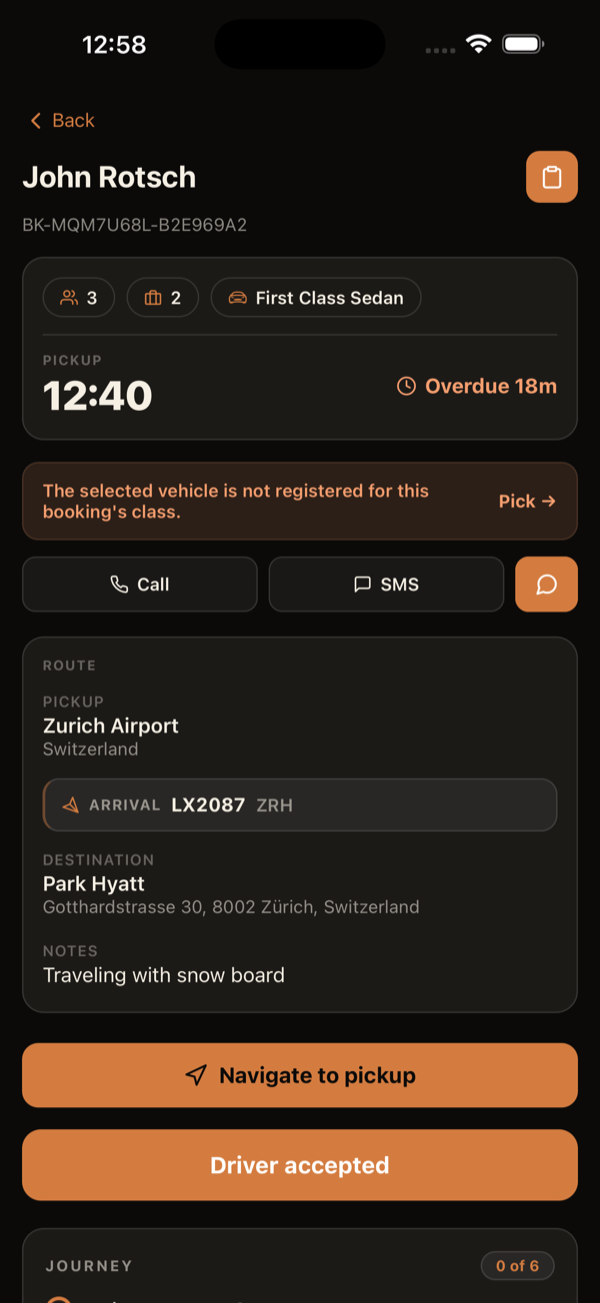
- Special luggage requested on the booking (golf bags, bikes, skis, boards and other bulky items) now shows on the ride detail, with a count per type — you know before leaving whether the vehicle fits.
- Amounts to earn and to collect now always show the cents (e.g. €23.60) instead of being rounded to the euro.
- On an extra ride linked to another booking (child task) the app no longer asks for payment or blocks you from finishing the ride.
- Addresses no longer repeat the place name (e.g. "Faro Airport · Montenegro, 8006-901 Faro" instead of "Faro Airport · Faro Airport, Montenegro, …").
- v2.13.0Sep 2026
Told when a booking changes or is cancelled, and child seats up front
- You now get a notification when your ride is CANCELLED — before, a cancelled ride could sit on your list with no warning and you would still drive to the pickup.
- You now get a notification when the operator CHANGES your ride (pickup time, pickup or drop-off address, notes or customer phone), saying what changed. Previously you were only told when dispatch made the edit.
- Child seats requested on the booking now appear on the ride card and detail, with type and quantity — no more digging through the comments.
- v2.12.2Aug 2026
Driver price — live and vehicle-aware
- Your price now shows the moment a ride is assigned/confirmed — no need to refresh the list to see it.
- The price updates automatically with your active vehicle (own vs. company), with no manual refresh, and now also appears on the ride detail.
- No-show rides now show the amount you earn in History and Earnings.
- v2.12.1Aug 2026
Google Maps shows up again for navigation (Android)
- On Android, Google Maps could show as unavailable in the navigation menu even when installed (Waze and HERE showed fine). Fixed — Google Maps is detected and selectable again.
- v2.12.0Aug 2026
No-show: evidence guide & capture time
- An "i" button on the no-show proof section shows what to photograph/film (recognizable entrance, arrival area with signs, license plates, call screenshot, short video…).
- Each photo/video records when and where it was captured; the thread shows "Taken · Uploaded" in the operator’s time and flags media uploaded long after it was taken.
- v2.11.0Aug 2026
No-show: multiple photos, videos & editing
- The no-show checklist now remembers what you’ve done — leave and return to the ride without redoing completed steps.
- Attach multiple photos and short videos (up to 60s) as proof, delete/replace them, and edit your comment before completing.
- v2.10.0Aug 2026
No-show requirement checklist
- No-show now shows a checklist of the requirements the operator configured — clearance, wait time, photo, comment and location — and only completes once they’re all green.
- New policies: require a comment and require GPS location (configurable per operator).
- v2.9.2Aug 2026
No-show proof in the ride thread
- The no-show proof photo and location now appear in the ride’s message thread (where dispatch sees them), and the photo no longer fails to send.
- v2.9.1Aug 2026
No-show proof photo, on the spot
- When the operator requires proof, the camera now opens right when you mark “no-show” and the no-show completes straight after — no bouncing to the chat and back.
- v2.9.0Aug 2026
Navigation-app detection fixed
- Waze and the other navigation apps (HERE, Sygic, TomTom, Yandex, OsmAnd) are now correctly detected when installed, instead of showing as “not installed”.
- You can now pick any of them as your preferred navigation app.
- v2.8.2Aug 2026
No-show errors in your language
- When a no-show (or cancellation) isn’t allowed, the app now shows a clear message in your language instead of a technical English alert.
- v2.8.1Jul 2026
Service tags on the ride detail
- The ride’s service tags now appear on the booking detail, each with its own name and colour.
- v2.8.0Jul 2026
Arrival/Departure & colour-coded class
- The Arrival/Departure badge shows again on every airport ride — the missing departures are now fixed.
- The service class now appears as a badge tinted with the class’s own colour, on both the list and the ride detail.
- v2.7.0Jul 2026
Itemized collection + QR card payment
- The collection card is now "Collect payment": it lists the ride's items (transfer, extras, surcharges) with per-item selection and partial collection.
- Cash or card per batch: card shows a QR — the customer pays on their own phone via Stripe and confirmation lands in the app instantly.
- Collecting cash now asks you to confirm the amount with the list of selected items before recording.
- Without a configured card gateway the Card option is disabled and offers cash instead of failing.
- Task comments are visible in the app, with a push notification when they are created, edited or deleted.
- Children and infants get their own icons and counts on the list and task detail.
- Name board with operator logo, top/left layout and light/dark theme.
- Arrival/Departure badge on the task list and detail, next to the service class — matching the web platform.
- v2.6.0Jun 2026
Driver wallet
- New Wallet tab: two balances side by side — Provision (your commission per ride) and Cash (what you collected in cash and still owe back).
- Each balance card doubles as a filter for its records.
- Tap a ride-linked entry to open a detail card; tap the card to open the full ride.
- The driver card at the top of Transfers now opens your Profile.
- v2.5.0Jun 2026
New animated app intro
- Opening the app now plays a short brand animation: the “C” becomes “cobodrive.”.
- Tap the screen to skip the intro at any time.
- v2.4.0Jun 2026
Cash collection, receipts & balance in history
- Cash collection: on rides to be paid in cash, arriving at the destination now shows a card to confirm the amount received — or record that the customer refused.
- Receipt to the customer: once you’ve been paid, send the ride receipt to the customer’s email, with pickup, destination, class and amount.
- Balance in history: cash-paid rides show a "Paid in cash" tag, and the total cash to hand in appears at the top of your history.
- Tap to copy addresses, plus small fixes on the task screen.
- v2.3.0Jun 2026
Reliable milestones, redesigned history & more
- Milestones fixed: advancing now sticks — no more "jumping back" or endless loading.
- Redesigned history: each ride on a clear card — time and name on one line, pickup and destination on their own lines, passengers, luggage, class and your earnings.
- The app updates itself: improvements arrive without having to close and reopen it several times.
- More frequent live location (~15s), and the "with customer" confirmation now fires reliably as you leave the pickup.
- v2.2.4Jun 2026
More reliable "with customer" confirmation
- The "with customer?" confirmation now appears reliably: once you drive away from the pickup (after "Arrived at pickup"), the prompt shows in ~15s — no need to stop the car anymore.
- v2.2.3Jun 2026
More frequent live location
- Your live location updates more often (about every 15s, ~4× more), so dispatch and the customer can follow you more precisely during a ride.
- v2.2.2Jun 2026
Faster everywhere
- Instant milestones — tapping shows the next step immediately; confirmation happens in the background.
- Faster login: single-company drivers go straight in, skipping the picker screen.
- Instant logout — you reach the login screen at once, cleanup runs in the background.
- Much snappier app: network requests up to ~100× faster thanks to auth caching.
- In history, each task shows your earnings (based on the vehicle you used), not the customer price.
- One consistent loading indicator app-wide; no double spinner on pull-to-refresh.
- v2.1Jun 2026
WhatsApp-style messaging + finished tasks in history
- Reworked composer: a "+" attach grid (photos, camera, documents) and voice recording with a live waveform.
- Optimistic send: the message appears instantly, with a "try again" option if it fails.
- Finished tasks leave the pending list but stay reachable in History — read-only, with the chat still working.
- Full-screen landscape passenger name board from the task screen.
- v2.0Jun 2026
Two-tier driver pricing + geofence reminders
- Driver payout depends on the vehicle used: own vs. company. The app always shows the right figure.
- On leaving the pickup area, the app asks "Are you with the customer?" before advancing — never on its own.
- The reminder also arrives as a push notification, even with the app backgrounded.
- Vehicle-type icon on tasks and reservations for quick scanning.
- v1.xJun 2026
Vehicles, shifts and notifications
- Vehicle picker that gates task milestones; driver-submitted vehicle registration.
- Shifts tab: view and accept proposed shifts.
- Push notifications for new rides, changes and messages, with distinct sounds.
- Background location so dispatch can see you during your shift.
- v0.3May 2026
Phase-aware task screen
- The task screen adapts to the phase: preparation, heading to pickup, at pickup, with customer, wrap-up.
- Milestone timeline with timestamps and a progress bar.
- Server-side guard against moving a milestone backwards.