App del conductor
Tus viajes,en tiempo real.
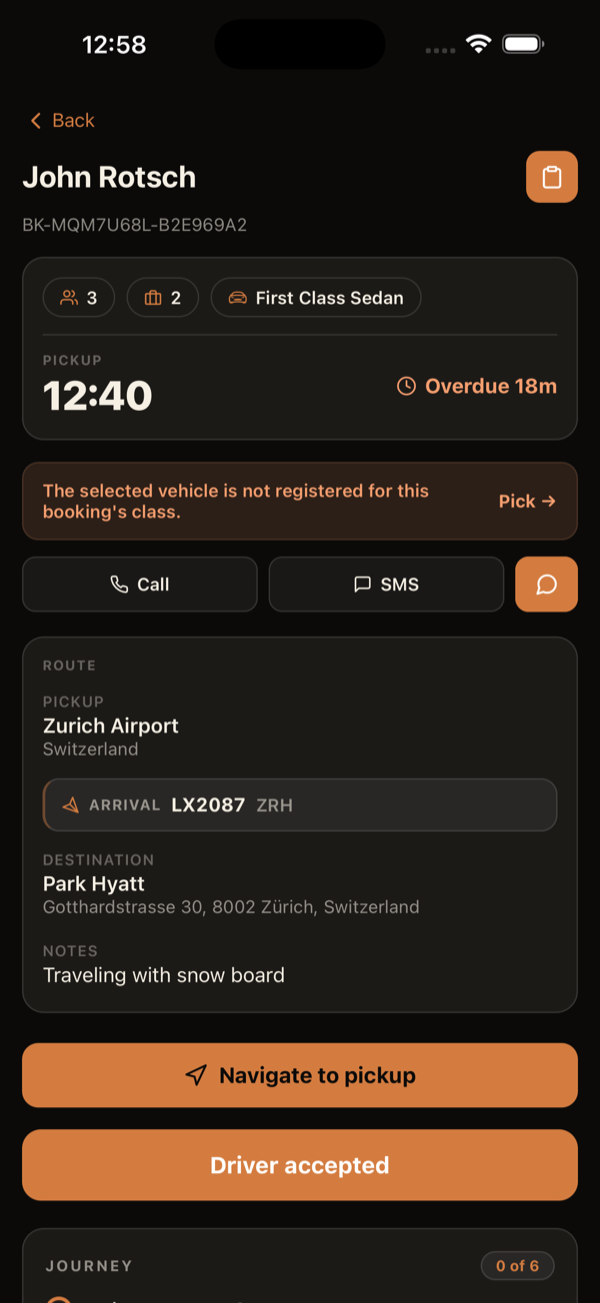
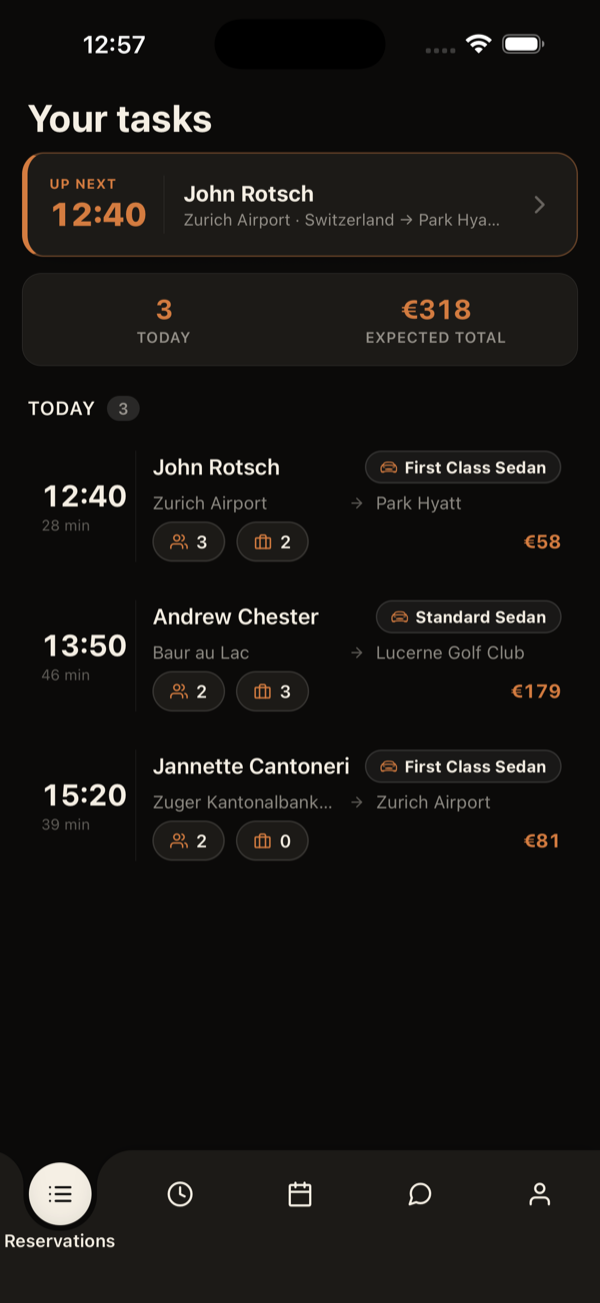
Recibe viajes en tiempo real, navega hasta el cliente y mantén al despacho informado de tu ubicación, todo desde tu móvil.

Qué hace
Pensada para conducir.
Despacho en tiempo real
Los nuevos viajes llegan al instante, con aviso sonoro y los detalles del trayecto.
Ubicación en segundo plano
El despacho ve tu posición durante el turno, y deja de verla en cuanto cierras sesión.
Registro del vehículo
Registra tu vehículo, fotos y documentos directamente desde la app.
Mensajes con el despacho
Habla con el despacho sin salir del viaje.
Requisitos
Compatibilidad de dispositivos
iOS
15.1+
iOS 15.1 o posterior
Android
12+
Android 12 o posterior
Permisos
La app necesita la ubicación en segundo plano (para que el despacho te vea durante tu turno) y las notificaciones (para avisarte de nuevos viajes incluso con la app cerrada).
- Ubicación (también en segundo plano): solo mientras tienes la sesión iniciada.
- Notificaciones: avisos de nuevos viajes.
Historial de cambios
Cómo ha evolucionado.
Cada versión y lo que aportó al día a día del conductor.
- v2.15.7Más recientenov 2026
Viajes de empresas colaboradoras
- En los viajes que tu empresa recibe de una empresa colaboradora, los pasos del viaje son los de la empresa que lo envió, los mismos que usan sus conductores.
- Si el idioma de tu teléfono no está disponible en la app, la app se muestra ahora en inglés (antes era en portugués).
- v2.15.6nov 2026
App y panel al mismo tiempo
- Si también haces el despacho, puedes tener la sesión abierta en la app y en el panel web al mismo tiempo. Entrar o salir en uno ya no cierra el otro; entrar en otro móvil sigue cerrando la sesión del móvil anterior.
- v2.15.5nov 2026
Aviso claro cuando la cuenta está suspendida
- Si tu empresa suspende tu cuenta de conductor (o desactiva tu cuenta), la app cierra la sesión y muestra «Tu cuenta de conductor está suspendida. Contacta con el despacho.» en lugar de un error técnico.
- v2.15.4oct 2026
La app muestra solo lo que tu empresa permite
- Tu empresa decide qué puedes hacer en la app: escribir en el messenger, cambiar tu plan de trabajo, elegir el vehículo, cobrar, enviar recibos y editar tu perfil.
- Lo que tu empresa no permite ya no aparece: en su lugar, una nota breve explica por qué (por ejemplo, «Tu plan de trabajo lo gestiona la empresa»).
- Sin cobro en la app, el viaje termina con normalidad: el pago queda en manos de la empresa. Tu vehículo activo se mantiene aunque no puedas cambiarlo.
- v2.15.3oct 2026
Cobrar en el móvil del cliente
- Al cobrar, la opción «Tarjeta» pasa a ser «Móvil», con el icono de QR: el cliente escanea el código y elige en su móvil cómo pagar (tarjeta, Apple Pay o Google Pay).
- Solo aparecen para cobrar los artículos que cobras tú: los que paga el operador o que el cliente ya pagó por el enlace quedan fuera.
- En efectivo, confirmas si recibiste el importe completo u otro menor (con un artículo seleccionado, nunca más de lo que falta); lo que falte queda pendiente. Un artículo ya pagado en parte muestra cuánto se pagó y solo cobra el resto.
- Después de cobrar, envías el recibo por email o por WhatsApp; el contacto viene de la reserva y puedes escribir otro.
- v2.15.2oct 2026
La app en tu idioma
- La app está ahora totalmente traducida a tu idioma (13 idiomas): nombres de los hitos, avisos y alertas, y el recordatorio antes de la recogida.
- v2.15.1oct 2026
The pickup-time-changed alert no longer repeats
- The pickup-time-changed alert shows once per change, instead of coming back at every milestone until the end of the ride.
- v2.15.0oct 2026
Pickup time changed: what changed, when and who changed it
- When the pickup time changes (by the operator, by dispatch or because of the flight), the ride shows a notice with the new time, the previous time, when it changed and who changed it. Tap "Seen" to close it; a new change shows again.
- The ride list marks rides whose time changed, with the old time struck through.
- The change alert no longer appears when you advance a milestone yourself (e.g. "passenger on board").
- Several notifications in a row for the same ride replace each other instead of piling up (while the app is open).
- v2.14.0oct 2026
Special luggage up front, prices to the cent and cleaner addresses
- Special luggage requested on the booking (golf bags, bikes, skis, boards and other bulky items) now shows on the ride detail, with a count per type — you know before leaving whether the vehicle fits.
- Amounts to earn and to collect now always show the cents (e.g. €23.60) instead of being rounded to the euro.
- On an extra ride linked to another booking (child task) the app no longer asks for payment or blocks you from finishing the ride.
- Addresses no longer repeat the place name (e.g. "Faro Airport · Montenegro, 8006-901 Faro" instead of "Faro Airport · Faro Airport, Montenegro, …").
- v2.13.0sept 2026
Told when a booking changes or is cancelled, and child seats up front
- You now get a notification when your ride is CANCELLED — before, a cancelled ride could sit on your list with no warning and you would still drive to the pickup.
- You now get a notification when the operator CHANGES your ride (pickup time, pickup or drop-off address, notes or customer phone), saying what changed. Previously you were only told when dispatch made the edit.
- Child seats requested on the booking now appear on the ride card and detail, with type and quantity — no more digging through the comments.
- v2.12.2ago 2026
Driver price — live and vehicle-aware
- Your price now shows the moment a ride is assigned/confirmed — no need to refresh the list to see it.
- The price updates automatically with your active vehicle (own vs. company), with no manual refresh, and now also appears on the ride detail.
- No-show rides now show the amount you earn in History and Earnings.
- v2.12.1ago 2026
Google Maps shows up again for navigation (Android)
- On Android, Google Maps could show as unavailable in the navigation menu even when installed (Waze and HERE showed fine). Fixed — Google Maps is detected and selectable again.
- v2.12.0ago 2026
No-show: evidence guide & capture time
- An "i" button on the no-show proof section shows what to photograph/film (recognizable entrance, arrival area with signs, license plates, call screenshot, short video…).
- Each photo/video records when and where it was captured; the thread shows "Taken · Uploaded" in the operator’s time and flags media uploaded long after it was taken.
- v2.11.0ago 2026
No-show: multiple photos, videos & editing
- The no-show checklist now remembers what you’ve done — leave and return to the ride without redoing completed steps.
- Attach multiple photos and short videos (up to 60s) as proof, delete/replace them, and edit your comment before completing.
- v2.10.0ago 2026
No-show requirement checklist
- No-show now shows a checklist of the requirements the operator configured — clearance, wait time, photo, comment and location — and only completes once they’re all green.
- New policies: require a comment and require GPS location (configurable per operator).
- v2.9.2ago 2026
No-show proof in the ride thread
- The no-show proof photo and location now appear in the ride’s message thread (where dispatch sees them), and the photo no longer fails to send.
- v2.9.1ago 2026
No-show proof photo, on the spot
- When the operator requires proof, the camera now opens right when you mark “no-show” and the no-show completes straight after — no bouncing to the chat and back.
- v2.9.0ago 2026
Navigation-app detection fixed
- Waze and the other navigation apps (HERE, Sygic, TomTom, Yandex, OsmAnd) are now correctly detected when installed, instead of showing as “not installed”.
- You can now pick any of them as your preferred navigation app.
- v2.8.2ago 2026
No-show errors in your language
- When a no-show (or cancellation) isn’t allowed, the app now shows a clear message in your language instead of a technical English alert.
- v2.8.1jul 2026
Service tags on the ride detail
- The ride’s service tags now appear on the booking detail, each with its own name and colour.
- v2.8.0jul 2026
Arrival/Departure & colour-coded class
- The Arrival/Departure badge shows again on every airport ride — the missing departures are now fixed.
- The service class now appears as a badge tinted with the class’s own colour, on both the list and the ride detail.
- v2.7.0jul 2026
Itemized collection + QR card payment
- The collection card is now "Collect payment": it lists the ride's items (transfer, extras, surcharges) with per-item selection and partial collection.
- Cash or card per batch: card shows a QR — the customer pays on their own phone via Stripe and confirmation lands in the app instantly.
- Collecting cash now asks you to confirm the amount with the list of selected items before recording.
- Without a configured card gateway the Card option is disabled and offers cash instead of failing.
- Task comments are visible in the app, with a push notification when they are created, edited or deleted.
- Children and infants get their own icons and counts on the list and task detail.
- Name board with operator logo, top/left layout and light/dark theme.
- Arrival/Departure badge on the task list and detail, next to the service class — matching the web platform.
- v2.6.0jun 2026
Cartera del conductor
- Nueva pestaña Cartera: dos saldos lado a lado — Provisión (tu comisión por viaje) y Efectivo (lo que cobraste en efectivo y aún debes entregar).
- Cada tarjeta de saldo sirve también como filtro de sus movimientos.
- Toca un movimiento vinculado a un viaje para abrir una tarjeta de detalles; toca la tarjeta para ver el viaje completo.
- La tarjeta del conductor en la parte superior de Transfers ahora abre tu Perfil.
- v2.5.0jun 2026
Nueva introducción animada de la app
- Al abrir la app verás una breve animación de marca: la “C” se convierte en “cobodrive.”.
- Toca la pantalla para saltar la introducción en cualquier momento.
- v2.4.0jun 2026
Cobro en efectivo, recibos y saldo en el historial
- Cobro en efectivo: en los viajes a pagar en efectivo, al llegar al destino aparece una tarjeta para confirmar el importe recibido — o registrar que el cliente lo rechazó.
- Recibo al cliente: una vez cobrado, envía el recibo del viaje al correo del cliente, con recogida, destino, clase e importe.
- Saldo en el historial: los viajes pagados en efectivo muestran la etiqueta "Pagado en efectivo" y el total de efectivo a entregar aparece arriba en tu historial.
- Copiar direcciones con un toque y pequeños ajustes en la pantalla de la tarea.
- v2.3.0jun 2026
Hitos fiables, historial renovado y más
- Hitos corregidos: al avanzar, el paso se queda fijo — se acabó el "salto atrás" y la carga infinita.
- Historial renovado: cada viaje en una tarjeta clara — hora y nombre en una línea, recogida y destino en líneas propias, pasajeros, equipaje, clase y tu ganancia.
- La app se actualiza sola: las mejoras llegan sin tener que cerrarla y abrirla varias veces.
- Ubicación en vivo más frecuente (~15s) y la confirmación "con el cliente" aparece de forma fiable al salir de la recogida.
- v2.2.4jun 2026
Confirmación "con el cliente" más fiable
- La confirmación "¿con el cliente?" ahora aparece de forma fiable: al alejarte del punto de recogida conduciendo (tras "Llegué a la recogida"), el aviso surge en ~15s — ya no hace falta detener el coche.
- v2.2.3jun 2026
Ubicación en vivo más frecuente
- Tu ubicación en vivo se actualiza con más frecuencia (cada ~15s, ~4× más), para que la central y el cliente te sigan con más precisión durante el viaje.
- v2.2.2jun 2026
Más rápido en todo
- Hitos instantáneos: al tocar, el siguiente paso aparece de inmediato; la confirmación ocurre en segundo plano.
- Inicio de sesión más rápido: los conductores de una sola empresa entran directos, sin la pantalla de selección.
- Cierre de sesión instantáneo: llegas a la pantalla de login al momento y la limpieza corre en segundo plano.
- App mucho más ágil: peticiones de red hasta ~100× más rápidas gracias a la caché de autenticación.
- En el historial, cada tarea muestra tus ganancias (según el vehículo que usaste), no el precio al cliente.
- Un único indicador de carga en toda la app; sin spinner doble al deslizar para actualizar.
- v2.1jun 2026
Mensajería estilo WhatsApp + tareas terminadas en el historial
- Compositor renovado: botón "+" con cuadrícula de adjuntos (fotos, cámara, documentos) y grabación de voz con onda en vivo.
- Envío optimista: el mensaje aparece al instante, con opción de "reintentar" si falla.
- Las tareas terminadas salen de la lista de pendientes pero siguen accesibles en el Historial: en modo lectura, con el chat aún funcionando.
- Cartel con el nombre del pasajero a pantalla completa (horizontal) desde la pantalla de la tarea.
- v2.0jun 2026
Tarifa del conductor en dos niveles + recordatorios por geocerca
- El pago al conductor depende del vehículo usado: propio vs. de la empresa. La app siempre muestra la cifra correcta.
- Al salir de la zona de recogida, la app pregunta "¿Estás con el cliente?" antes de avanzar, nunca por su cuenta.
- El recordatorio también llega como notificación push, incluso con la app en segundo plano.
- Icono del tipo de vehículo en tareas y reservas para una lectura rápida.
- v1.xjun 2026
Vehículos, turnos y notificaciones
- Selector de vehículo que controla los hitos de la tarea; registro de vehículos por el conductor.
- Pestaña de turnos: consulta y acepta propuestas de turno.
- Notificaciones push para nuevos viajes, cambios y mensajes, con sonidos distintos.
- Ubicación en segundo plano para que la central te vea durante tu turno.
- v0.3may 2026
Pantalla de tarea por fases
- La pantalla de la tarea se adapta a la fase: preparación, camino a la recogida, en la recogida, con el cliente, cierre.
- Línea de tiempo de hitos con marcas de hora y barra de progreso.
- Protección del servidor contra retroceder un hito ya pasado.